How do I schedule Mastodon posts?
Short answer
On your Mastodon server open Preferences, Development, New application, name it BoostPoster with read and write, save it and copy "Your access token". Paste the token and your server's address into BoostPoster's Connections, Mastodon, then drop posts on days in Poster. Posts take up to 500 characters, pictures up to 16 MB and videos up to 99 MB.
Very soon: Connect Mastodon, when BoostPoster opensWhat do I need before I start?
| You need | Where to get it |
|---|---|
| A Mastodon account | Any server; see the sign-up guide |
| An access token | Your server: Preferences, Development, New application |
| A BoostPoster account | Free plan, no card needed |
How do I schedule a Mastodon post, step by step?
- Make an application. On your Mastodon server open Preferences, Development, New application. Name it BoostPoster, keep the scopes read and write, and save.
Screenshot: Mastodon, Development, New application
ext-mastodon-new-applicationMastodon, Development, New application - Copy the token. Open the application and copy “Your access token”.
- Connect it. In BoostPoster open Connections, press Mastodon, and enter your server and the token.
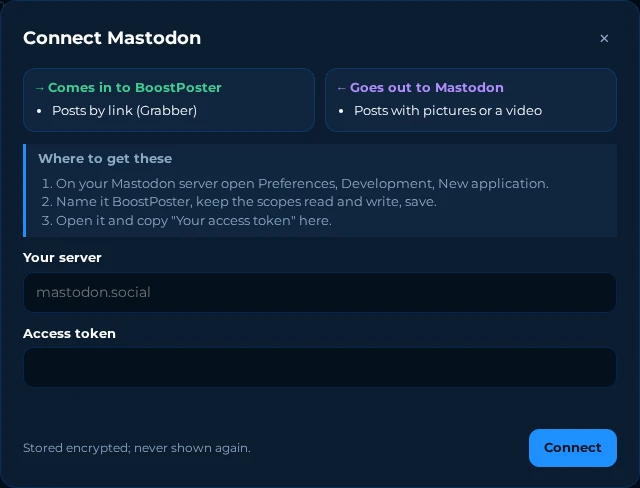
Connections, the Mastodon window - Plan posts. In Poster drop a file on a day, write the text, pick the Mastodon account and the time.
Animation: A picture dragged onto the calendar
app-poster-drag-to-dayA picture dragged onto the calendar
What does Mastodon take through BoostPoster?
| Content | Limit |
|---|---|
| Text | 500 characters |
| Pictures | Up to 16 MB |
| GIFs and videos | Up to 99 MB |
Checked 23 Nov 2026.
Questions
Does BoostPoster need my Mastodon password?
No. It uses the access token of the application you made; delete that application on your server to cut it off at any time.
Does it work with any Mastodon server?
Yes. Type your own server's address, such as mastodon.social, in the Mastodon window.
How long can a post be?
Up to 500 characters through BoostPoster.