How do I connect a Lemmy account to BoostPoster?
Short answer
Open Connections, choose Lemmy, and enter your server, user name, password and the community to post to. BoostPoster signs in once and keeps only the sign-in, never the password. Two-factor sign-in must be off for that account.
Very soon: Connect Lemmy, when BoostPoster opensWhat do I need before I start?
| You need | Where to get it |
|---|---|
| A Lemmy account | Any Lemmy server, such as lemmy.world. A separate account for posting is safest |
| Two-factor sign-in off | The account’s settings on its Lemmy server |
| The community’s name | [email protected], or the community’s link |
How do I connect it, step by step?
- Open Connections and choose Lemmy. In BoostPoster open Connections and press Lemmy.
Connections, the Lemmy tile - Enter your server and sign-in. Your server is the address after the @ in your Lemmy name, for example
lemmy.world. Then your user name and password.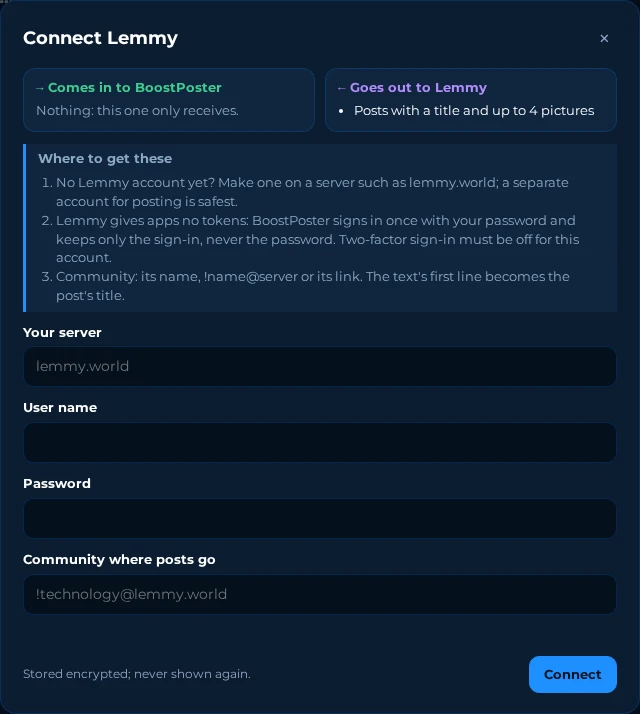
The Lemmy window, server and sign-in filled - Name the community. Type
!name@serveror paste the community’s link. Posts go there. - Plan a post in Poster. Drop a picture on a day. The first line of the text becomes the post’s title on Lemmy.
Animation: A picture dragged onto the calendar
app-poster-drag-to-dayA picture dragged onto the calendar
What does Lemmy accept?
| Content | Through BoostPoster |
|---|---|
| Pictures and GIFs | Up to 10 MB |
| Video | Not yet |
| Text | Up to 50,000 characters |
| Title | The first line of the text |
Checked 23 Nov 2026.
Questions
Why does BoostPoster need my Lemmy password?
Lemmy gives apps no sign-in tokens of their own. BoostPoster signs in once with the password and keeps only the sign-in.
Can I keep two-factor sign-in on?
No. Turn it off for the account you connect. That is why a separate account for posting is safest.
Can I post videos to Lemmy?
Not yet. Pictures and GIFs up to 10 MB work today.