How do I schedule Bluesky posts for free?
Short answer
Bluesky cannot schedule posts by itself. Connect your Bluesky account to BoostPoster with an app password, drop a post on a day and time in Poster, and it goes out then. The Free plan covers 3 accounts and 60 posts a month, with no card.
Very soon: Connect Bluesky, when BoostPoster opensWhat do I need before I start?
| You need | Where to get it |
|---|---|
| A Bluesky account | bsky.app, free |
| An app password | Bluesky: Settings, Privacy and security, App passwords |
| A BoostPoster account | Free plan, no card needed |
How do I schedule a Bluesky post, step by step?
- Make an app password. In Bluesky open Settings, Privacy and security, App passwords. Add one named BoostPoster and copy it.
Screenshot: Bluesky, App passwords
ext-bluesky-app-passwordsBluesky, App passwords - Connect Bluesky. In BoostPoster open Connections, press Bluesky, and enter your handle (for example
name.bsky.social) and the app password.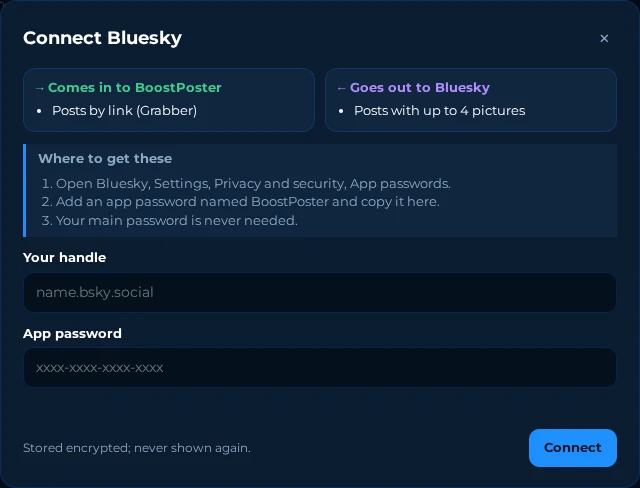
Connections, the Bluesky window - Plan the post. Open Poster, drag a picture (PNG, JPG or WebP under 976 KB) from the shelf onto a day, write the text, pick the time and the Bluesky account.
Animation: A picture dragged onto the calendar
app-poster-drag-to-dayA picture dragged onto the calendar - Check the queue. The post waits in the Queue and goes out at its time. You can change or delete it until then.
What does a scheduled Bluesky post allow?
| Content | Through BoostPoster |
|---|---|
| Text | Up to 300 characters |
| Pictures | PNG, JPG or WebP, under 976 KB |
| Video and GIF | Not through BoostPoster yet |
| Accounts on the Free plan | 3 social accounts, 60 posts a month |
| Posts waiting per account (Free) | 10 |
Checked 23 Nov 2026.
Questions
Does Bluesky have its own post scheduler?
No. The Bluesky app posts at once; scheduling needs an outside tool that posts for you at the chosen time.
Do I give BoostPoster my Bluesky password?
No. You make an app password in Bluesky's settings for BoostPoster only. You can delete it there at any time, and your main password is never needed.
How long can a scheduled Bluesky post be?
Up to 300 characters.
Can I schedule a video to Bluesky?
Not yet. Through BoostPoster, Bluesky takes pictures (PNG, JPG or WebP under 976 KB) with text.