How do I connect Misskey to BoostPoster?
Short answer
On your Misskey server open Settings, API, Generate access token, name it BoostPoster and allow it to write notes and drive files. Copy the token into BoostPoster's Connections, Misskey with your server's address, such as misskey.io. Notes take up to 3,000 characters.
Very soon: Connect Misskey, when BoostPoster opensHow do I connect Misskey, step by step?
- Generate a token. On your Misskey server open Settings, API, Generate access token.
Screenshot: Misskey, Generate access token
ext-misskey-access-tokenMisskey, Generate access token - Allow writing. Name it BoostPoster and allow it to write notes and drive files, then copy the token.
- Connect it. In BoostPoster open Connections, press Misskey, enter your server and paste the token.
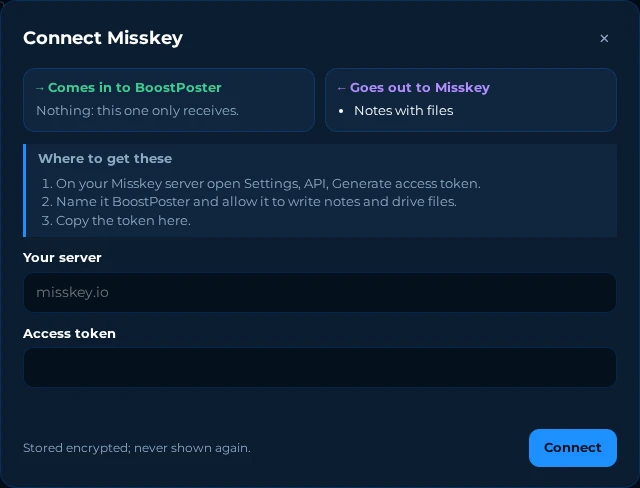
Connections, the Misskey window - Plan notes. In Poster drop files on days and pick the Misskey account.
Checked 23 Nov 2026.
Questions
Does it work with any Misskey server?
Yes. Type your own server's address in the Misskey window.
Which permissions does the token need?
Writing notes and drive files; the drive holds the pictures and videos a note carries.
How do I make a Misskey account?
In BoostPoster's Sign-ups choose Misskey; on misskey.io a name takes up to 20 letters, digits and underscores, and sign-up needs an email address and a CAPTCHA.