How do I schedule posts in a Telegram channel?
Short answer
Make a bot with @BotFather and copy its token, add the bot to your channel as an admin allowed to post, then connect the token and the channel's @name in BoostPoster's Connections, Telegram. After that, drop files on days in Poster and the bot posts them to the channel at their times.
Very soon: Connect Telegram, when BoostPoster opensWhat do I need before I start?
| You need | Where to get it |
|---|---|
| A Telegram channel or group | Telegram: New Channel; see the sign-up guide |
| A bot token | @BotFather in Telegram, command /newbot |
| A BoostPoster account | Free plan, no card needed |
How do I schedule channel posts, step by step?
- Make a bot. Talk to @BotFather in Telegram, send
/newbot, answer its questions and copy the token it gives.Screenshot: @BotFather, the new bot's tokenext-telegram-botfather-token@BotFather, the new bot's token - Make the bot an admin. Open your channel, Administrators, Add admin, find the bot and allow it to post.
Screenshot: Telegram, the bot added as an admin
ext-telegram-add-adminTelegram, the bot added as an admin - Connect it. In BoostPoster open Connections, press Telegram, paste the bot token and type the channel’s @name (or its numeric id).
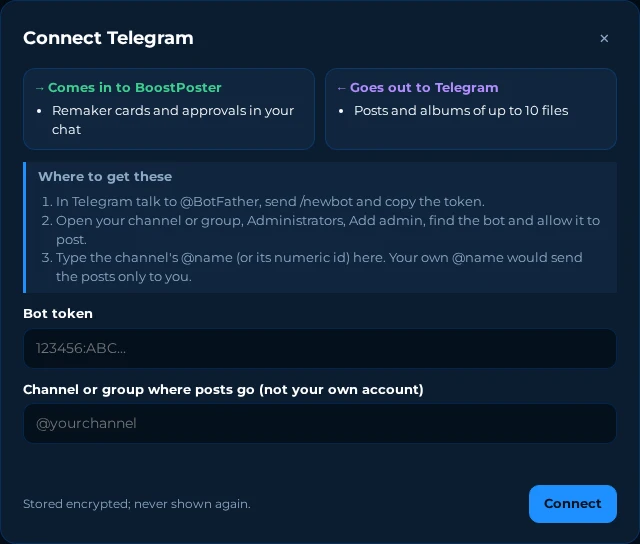
Connections, the Telegram window - Plan posts. In Poster drop files on days or spread a whole folder; the bot posts each one at its time.
Screenshot: The plan window spreading a folder over a month
app-poster-plan-windowThe plan window spreading a folder over a month
Checked 23 Nov 2026.
Questions
Why does BoostPoster need a bot and not my own account?
A bot that is an admin of the channel posts in it; your own account and its sign-in stay out of it.
The posts arrive only in my own chat. What went wrong?
Your own @name was typed instead of the channel's. Type the channel's @name, or its numeric id for a private channel.
Can I post to a group instead of a channel?
Yes. Add the bot to the group as an admin that may post, and type the group's @name or numeric id.
How long can a post be?
Up to 1,024 characters of text with a picture or a video.